The lights on a media facade are only as good as the system controlling them. In our commissioning records, the fixtures themselves almost never fail on opening night — the control layer does. A media facade lighting control system is the chain that carries a designed scene from software to every fixture, in sync, frame after frame.
This guide explains that chain through its four pillars — DMX512, Art-Net, Madrix, and synchronization — with the parameters, wiring realities, and field lessons we’ve learned building these systems. If you’re specifying one, explore our media facade lighting control system solutions.
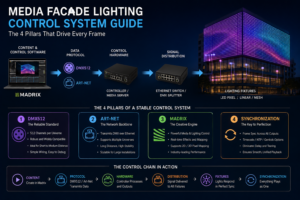
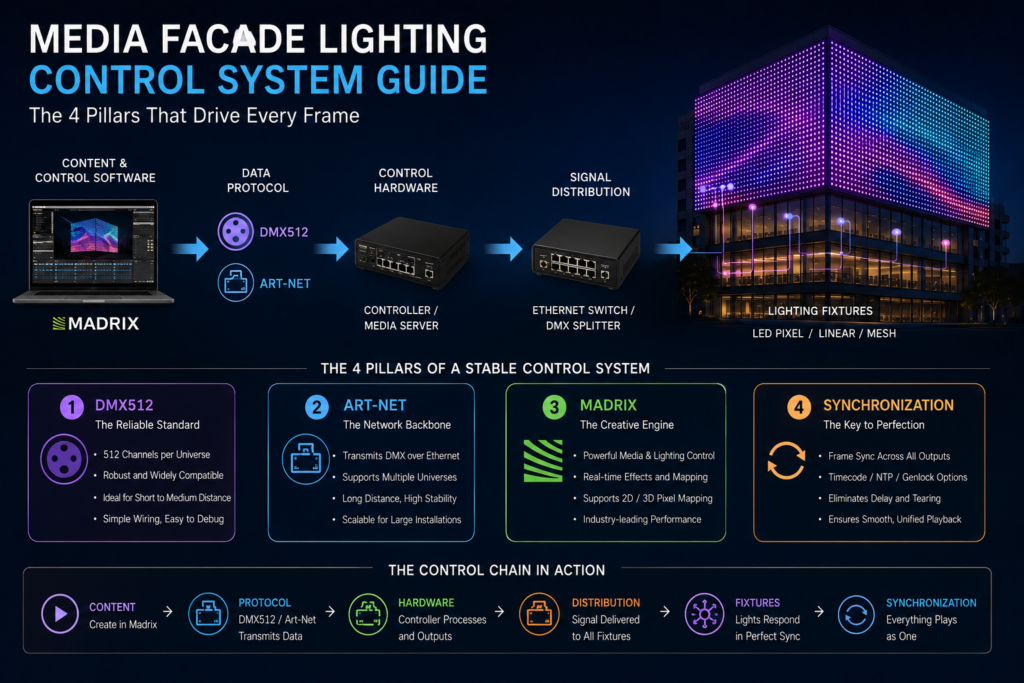
The Control Chain at a Glance
A media facade control system moves data downstream in a fixed order:
Madrix (software) designs and generates the content → Art-Net carries it over the network as multiple DMX universes → converted to DMX512 at the fixtures → all of it locked in synchronization so the whole facade shows one unified image.
Each pillar solves one problem. Understand all four and you understand why a facade either runs flawlessly or flickers out of step.
1. DMX512: The Language Spoken to the Fixtures
Definition
DMX512 (formally ANSI E1.11, USITT DMX512-A) is the lighting-control standard that carries up to 512 channels of data per “universe” over shielded twisted-pair cable using the RS-485 electrical standard. Every professional facade fixture we build speaks it natively.
How It Works
Each fixture is assigned a start address. The controller streams 512 channel values continuously; a fixture reads only the channels at its address — for example, an RGB fixture at address 100 listens to channels 100 (red), 101 (green), 102 (blue). One universe therefore controls roughly 170 RGB fixtures (512 ÷ 3) before a new universe is needed.
The Points That Matter in the Field
- Cable discipline: DMX demands proper shielded twisted-pair (we spec 120Ω) and a terminating resistor at the last fixture. On a [hotel] project we were called to troubleshoot, intermittent flicker traced entirely to a missing terminator — a five-cent part causing a whole facade to stutter.
- Run length: DMX is robust over distance but not infinite. We keep segments within standard limits and insert signal repeaters on long facade runs rather than daisy-chaining past the reliable limit.
- Addressing errors are the most common DMX fault we see — two fixtures sharing an address behave identically, breaking the image. Documenting an address map before install saves days of on-site debugging.
Why DMX Still Anchors Facades
DMX’s strength is robustness and noise immunity outdoors, where electrical interference is unavoidable. It is the reliable “last mile” that actually reaches the fixtures — which is why, no matter how the upstream network is built, the signal converges to DMX at the building.
2. Art-Net: Carrying Hundreds of Universes Over One Network
Definition
Art-Net is a protocol that transports DMX512 data over standard Ethernet networks (TCP/IP). A large media facade needs far more than 512 channels — often dozens or hundreds of universes — and running a separate DMX cable for each is impractical. Art-Net solves this by packing many universes into ordinary network traffic over a single Cat6 or fiber line.
How It Works
Software outputs DMX universes as Art-Net packets, each tagged with a universe number. A network switch distributes them to Art-Net-to-DMX nodes placed around the facade, which convert the relevant universes back into physical DMX signals for the fixtures in their zone. This is what makes large, distributed facades manageable — the heavy data travels as network packets, and DMX only handles the final short runs.
Field-Tested Requirements
- Plan the network first. On our early large projects, the hardest failures were never fixture faults — they were data topology problems: too many universes on one switch, or nodes placed without regard to cable distance. We now map universes, switch capacity, and node placement before fixture layout is frozen.
- Use managed switches and fiber backbones on tall towers — fiber for the vertical riser (distance and noise immunity), copper only near the fixtures.
- Separate the lighting network from any building IT network. Art-Net is broadcast-heavy; sharing a network invites packet loss that shows on the facade as dropped frames.
Related Standard
Many modern systems also use sACN (ANSI E1.31), a similar streaming protocol. The planning logic — universes, switches, node placement — is identical.
3. Madrix: Where the Content Is Created
Definition
Madrix is professional media-server and lighting-control software widely used to author and drive pixel-based media facades. It sits at the top of the chain, generating the content and outputting it as Art-Net (or sACN) universes to the network below.
What It Actually Does
- Pixel mapping: Madrix builds a virtual model of the facade, assigning every physical fixture a coordinate so the software knows which part of an image each fixture displays. Accurate mapping is the difference between a coherent picture and visual noise — and in our experience it is the single most time-consuming, most important commissioning step.
- Content generation: built-in effects, plus mapped video, images, and real-time generative visuals across the fixture grid.
- Scheduling: scene automation by time and date, so the facade runs programmed content nightly without an operator present.
Field Lessons on Madrix
- The virtual map must match reality exactly. On a [tower] project, a section of pixels was wired in reverse order; until the map was corrected to match the actual wiring, that zone played its content mirrored. Now we verify wiring order zone-by-zone against the map during commissioning, not after.
- Match the license and hardware to fixture count. Madrix output capacity is tied to licensing and processing headroom — undersizing it caps how many pixels you can drive smoothly. We size this against the final pixel count from day one.
- Build a mock-up first. For any large facade, we commission a single representative bay and prove the full chain — Madrix → Art-Net → node → DMX → fixture — before mass installation. It’s the cheapest insurance in the project.
4. Synchronization: Making the Whole Facade One Picture
Why Synchronization Is the Real Challenge
Individually, every fixture can work perfectly and the facade can still fail — because if zones update out of step, imagery tears, jitters, or ripples across the surface. Synchronization is what makes thousands of independent fixtures behave as one coordinated display. It is, in our experience, where amateur and professional systems visibly diverge.
How Synchronization Is Achieved
- A single master timing source. One controller or media server governs the frame timing; all nodes follow it. Multiple uncoordinated sources are the classic cause of a facade that “waves” out of sync.
- Consistent frame rate end to end. The whole chain must hold a stable, common frame rate. Mismatched rates between software output and node processing produce stutter even when every fixture is healthy.
- Network integrity. Because Art-Net timing rides on the network, packet loss directly becomes visible desync. This is precisely why we isolate the lighting network and use managed switches — synchronization is won or lost at the network layer.
- Genlock / time-sync on multi-server systems. When a facade is too large for one server, multiple servers must be locked to a shared timing reference so their outputs stay frame-aligned.
A Field Example
On a [X]-square-meter facade split across [X] Art-Net nodes, our first test run showed a faint diagonal “wipe” — the far zones lagged the near ones by a frame or two. The cause wasn’t the fixtures; it was an unmanaged switch introducing variable latency. Swapping to a managed switch with proper traffic handling locked the image solid. Synchronization problems are almost always network problems wearing a lighting costume.
Putting the Chain Together
A single frame of content travels like this:
Madrix renders the frame and maps it to fixture coordinates → outputs it as Art-Net universes over the isolated Ethernet network → Art-Net-to-DMX nodes in each zone convert their universes to DMX512 → fixtures display their assigned channels → a master timing source ensures every zone shows the same frame at the same instant.
Get all four pillars right and the facade reads as one living surface. Get any one wrong — a missing DMX terminator, an overloaded switch, a mismapped zone, an unsynced server — and the failure is visible from across the city.
Control System Layer Overview
| Layer | Element | Role in the System | Key Field Concern |
|---|---|---|---|
| Software | Madrix | Content creation, pixel mapping, scheduling | Accurate map; license sized to pixel count |
| Transport | Art-Net | Carries many universes over Ethernet | Network topology; isolated managed switches |
| Fixture control | DMX512 | Final signal to each fixture | Addressing, termination, run length |
| Timing | Synchronization | Locks all zones into one image | Single master clock; network integrity |
FAQ
Q: What is a media facade lighting control system? The hardware-and-software chain that carries designed content — via software (Madrix), network transport (Art-Net), and fixture protocol (DMX512) — to every fixture in perfect synchronization so the facade displays as one image.
Q: How many fixtures can one DMX universe control? About 170 RGB fixtures (512 channels ÷ 3 channels each). Larger facades use many universes carried together over Art-Net.
Q: Why use Art-Net instead of running DMX everywhere? A large facade needs far more than one universe’s 512 channels. Art-Net carries hundreds of universes over a single network cable, converting to physical DMX only near the fixtures.
Q: What causes a media facade to flicker or lose sync? In our experience, almost always the network or wiring — a missing DMX terminator, an overloaded/unmanaged switch, address conflicts, or multiple uncoordinated timing sources — not the fixtures themselves.
Q: What does Madrix actually do? It creates and maps the content, assigns each fixture its coordinate (pixel mapping), and outputs the show as Art-Net universes to the network, including automated scheduling.
Q: How is synchronization guaranteed across a huge facade? A single master timing source, a consistent end-to-end frame rate, an isolated managed network, and genlock/time-sync when multiple servers are involved.
Looking for a reliable media facade lighting control system? Explore our complete solutions for DMX512, Art-Net, Madrix integration, and synchronized facade control systems.
Explore Media Facade Lighting Control Systems →
References
- ANSI E1.11 (USITT DMX512-A) — DMX512 data transmission standard, ESTA Technical Standards Program https://tsp.esta.org/tsp/documents/published_docs.php
- ANSI E1.31 (sACN) — Streaming ACN for transport of DMX512 over IP networks https://tsp.esta.org/tsp/documents/published_docs.php
- Art-Net — Ethernet protocol specification, Artistic Licence https://art-net.org.uk/
- MADRIX — Official software documentation, inoage GmbH https://www.madrix.com/
- IEC 60529 — Degrees of protection provided by enclosures (IP Code) https://webstore.iec.ch/publication/2452