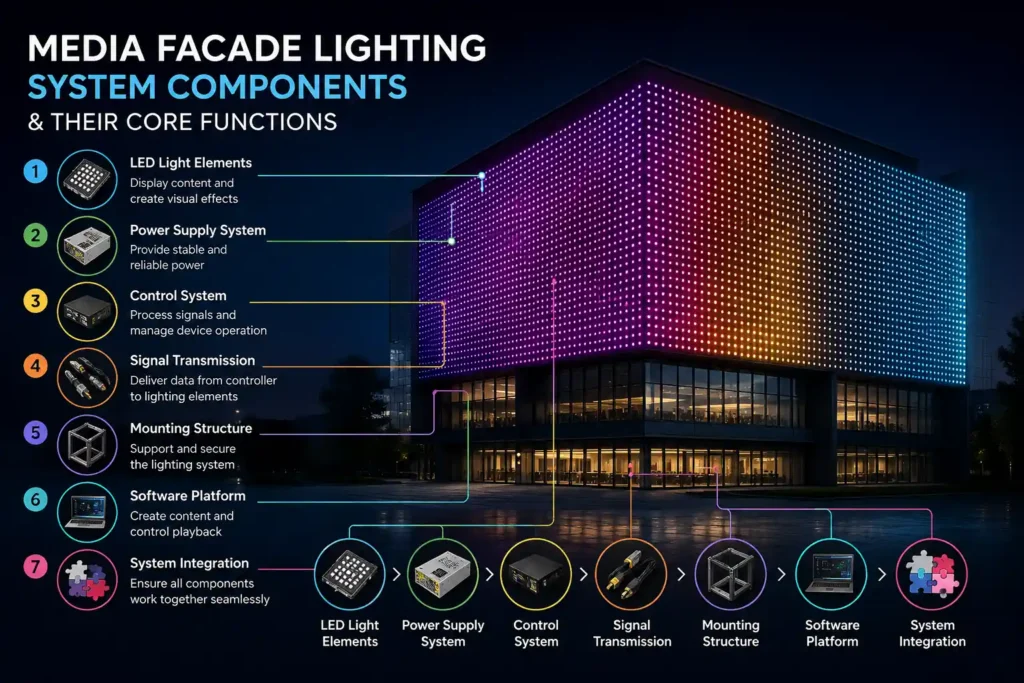
A media facade lighting system turns a building’s exterior into a programmable visual surface — displaying color, animation, and content across the entire architectural envelope. That capability doesn’t come from any single device. It emerges from seven specialized components working as one system — and in our experience, most project failures trace back to an undervalued component, not a faulty one.
Here’s what each part does, and what we’ve learned specifying them on real buildings.
1. LED Pixel Lights
The Building Blocks of Imagery
Each pixel is an individually addressable point of light — the control system sets its color and brightness independently. Thousands of points arranged in a grid form a low-resolution display capable of patterns, gradients, and video content.
How Resolution Is Defined — and How to Not Overpay
Visual quality depends on pixel pitch — the spacing between pixels. Closer spacing means finer detail; wider spacing suits distant viewing.
Here’s the practical insight clients rarely hear: facades don’t need screen-level resolution. On a mall project in [城市], we specified [15mm] pitch for the lower three floors (pedestrian viewing distance) and [40mm] for the upper floors seen only from across the plaza — cutting the pixel count by roughly [60%] with no visible quality loss from any real viewing position. Matching pitch to actual viewing distance is the single biggest cost lever in a pixel system.
Where Pixel Lights Excel
Pixels handle what static lighting cannot: moving imagery, choreographed sequences, real-time effects. On grid-structured or transparent architecture, they preserve daytime transparency while delivering full nighttime display. They are the defining element of any media facade lighting installation.
2. LED Mesh Screen
Transparency Meets Display
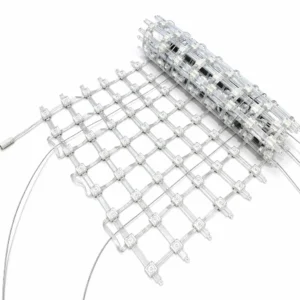
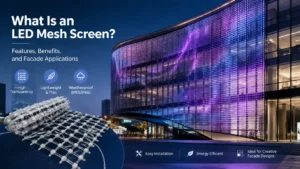
An LED mesh screen is a flexible, see-through grid of LED strands hung against or integrated into a facade. It displays imagery at night while letting light, air, and views pass through by day.
Why Facades Use Mesh
A solid display panel would black out windows and darken interiors. Mesh preserves the building’s daytime function — occupants still see out, and the glass architecture still reads as glass. This is why mesh, not rigid panels, is the default answer for curtain-wall towers.
A Lesson From the Field
Mesh is lightweight and conforms to curved geometry — but wind load is the detail that bites. On our first large mesh installation, the structural engineer’s wind calculations forced a late redesign of the attachment points. Since then, we bring facade structure and wind analysis into the conversation before finalizing mesh coverage, not after. If your supplier doesn’t ask about wind zone, that’s a warning sign.
3. LED Linear Lights
Defining Line and Structure
Linear lights are continuous LED bars tracing the building’s edges, floor lines, columns, and cornices. In a media system they do two jobs: outline architectural geometry, and — when individually addressable — act as linear pixel elements in the overall animation.
Emphasizing Architectural Rhythm
Chase effects and gradients traveling along floor lines create movement that follows the building’s own form. In practice, we find linear-only schemes deliver most of the perceived “media effect” at a fraction of a full pixel grid’s cost — which is why we often recommend clients start with addressable linear and add pixels later where content truly demands them.
Integration Into the Media Layer
Pixel-controlled linear segments run inside the same control system as pixels and mesh, so outlines and display surfaces animate as one composition — not separate lighting layers. See how these elements combine in a complete media facade lighting design.
4. Wall Washer
Broad, Even Surface Illumination
A wall washer spreads smooth, uniform light across a wide surface. Where pixels create points and mesh creates imagery, washers provide the broad fields of consistent color that give a composition its base.
Its Role in the Media System
Washers fill the surfaces between and behind the finer media elements, shifting hue in unison with pixel content. The combination — washed fields plus pixel detail — is what separates a rich facade from a scattered one. A common mistake we see in bids: pixel budgets with no wash layer at all. The result on opening night is imagery floating on a dark, dead building.
Color and Coordination
RGB/RGBW washers under the same control system let designers treat broad planes as active parts of the composition — expanding, contracting, and recoloring in time with the animation.
5. Floodlight
Lighting Large and Distant Surfaces
Floodlights are high-output fixtures covering expansive planes and tall sections from a distance — the sheer output needed for big architectural areas.
Role in the Composition
Floods anchor the facade’s overall brightness so the building reads clearly at skyline distances where pixel detail disappears. From experience: check the facade from its farthest real viewpoint during commissioning — a scheme that looks balanced from the street can vanish from a kilometer away if the flood layer is undersized.
Coordinated High-Output Layer
RGB/RGBW floods change color with the media content, adding the bold, large-scale layer a facade needs to be seen — and photographed — from across a city.
6. Controller
The Brain of the System
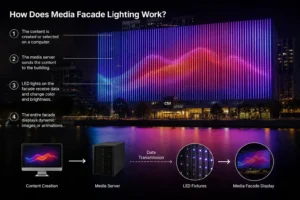
The controller receives the content and distributes instructions to every pixel, mesh line, linear segment, washer, and flood — telling each exactly what to show, frame by frame.
Pixel Mapping and Synchronization
Its central task is pixel mapping: assigning each physical fixture a coordinate so imagery flows across all components as one unified picture.
The Hard Lesson: Plan the Data Before the Fixtures
On an early large pixel project, every fixture worked perfectly on the bench — but the facade couldn’t hold sync over long data runs. The fix cost weeks. We now design the data topology (universes, controller placement, cable distances) before finalizing fixture positions, and we’d advise anyone specifying a media facade lighting system to do the same. Underestimating control infrastructure is the most common failure mode we encounter — the lights work; the system doesn’t.
The controller also handles scheduling and automation — programmed scenes, event content, timed dimming — so the facade runs reliably without an operator.
7. Power Supply
Feeding the Entire System
Power supplies convert mains power into the stable low-voltage supply every fixture and controller requires.
Distributed Across the Facade — Learned the Hard Way
On a [28]-story tower, an early centralized power design left the top floors visibly dimmer than the base — voltage drop over long runs, invisible on paper, obvious at night. Redistributing supplies every [6] floors fixed the gradient. Since then, distributed power placement is in our first drawing, not our revision list.
Reliability as the Foundation
Correctly sized supplies (we spec them to run at no more than [70–80%] of rated load) run cooler and last longer. In our warranty records, power-side failures outnumber LED failures by a wide margin — which is why supply quality and headroom matter more than headline fixture specs.
How the Components Work Together
- Pixels, mesh, and linear lights create the detailed, dynamic imagery.
- Washers and floods supply the broad color fields and skyline-scale brightness.
- The controller binds everything into one synchronized picture.
- The power layer keeps it all alive and even, night after night.
Not every facade needs all seven. A color-changing scheme may need only linear lights, washers, and a controller; full video content demands pixels or mesh. Match components to the effect you actually want — and if you’re unsure which, our engineers will review your elevation drawings and tell you honestly what your building needs (and doesn’t). Explore our complete media facade lighting solutions.
Component Overview
| Component | Primary Role | Key Function |
|---|---|---|
| LED Pixel Lights | Dynamic imagery | Addressable points forming the display |
| LED Mesh Screen | Transparent display | See-through imagery, daytime views preserved |
| LED Linear Lights | Line & rhythm | Outlining structure; linear pixel animation |
| Wall Washer | Broad color fields | Smooth large-area background layer |
| Floodlight | Large-scale output | Skyline-distance brightness anchor |
| Controller | System brain | Pixel mapping, sync, scheduling |
| Power Supply | Energy foundation | Stable distributed low-voltage power |
FAQ
Q: What’s the difference between pixel lights and a mesh screen? Pixels are individual points mounted on the structure; mesh is a flexible transparent curtain of LED strands that preserves daytime views. Both are addressable.
Q: Do I need all seven components? No. Simple color-changing facades often need only linear lights, washers, and a controller. Pixels and mesh are only necessary when you want actual imagery or video.
Q: Why do media facades need wall washers if pixels make the imagery? Washers fill the planes between pixel elements. Without them, imagery floats on a dark building — a mistake we regularly see in pixel-only budgets.
Q: What does the controller actually do? It maps every fixture to a coordinate and sends synchronized frame-by-frame instructions so the whole facade displays as one picture.
Q: Why are power supplies spread across the facade instead of centralized? Voltage drop. Long low-voltage runs dim the far end visibly — we’ve fixed exactly this on a high-rise by redistributing supplies every few floors.
Q: What is pixel pitch, and what should I choose? The spacing between pixels. Match it to real viewing distance — wider pitch for surfaces seen from afar can cut pixel count (and cost) dramatically with no visible loss.
References
ANSI C78.377 — Chromaticity (SDCM/MacAdam ellipse) specification
U.S. Department of Energy, Solid-State Lighting Program — LED system and reliability research https://www.energy.gov/eere/ssl/solid-state-lighting
IES LM-79 / LM-80 — Photometric measurement and lumen maintenance standards
IEC 60529 — Degrees of protection (IP Code)